Doubled your budget and performance only improved by 10%? Sorry to hear it. Before you increase your Google Ads budget, make sure the problem is actually budget. The way to know is lost impression share, a metric that sits between ad quality and budget and tells you where the problem really is.
In this Google Ads series I’ve covered several metrics around ad quality. Impression share tells you, out of every time your ad could have shown, how many times it actually showed. Today we answer the follow-up question: the times it didn’t show, why not?
Quick answer: Google Ads splits the impressions you missed into two columns. Search lost IS (budget) is the share you missed because your budget ran out. Search lost IS (rank) is the share you missed because your Ad Rank wasn’t high enough, which means your bid, your ad quality, or both. More budget can only win back the budget share. Rank loss comes back with a better ad, a better landing page and smarter bidding.
- Check both columns before you raise any budget.
- High lost IS (budget): budget is a real lever, if the traffic is profitable.
- High lost IS (rank): money alone won’t fix it. Work on quality and bids.
What Is Impression Share in Google Ads?
Google defines Search impression share as the impressions you received on the Search Network divided by the estimated number of impressions you were eligible to receive. Eligibility is estimated from things like your targeting settings, approval statuses and quality. So a 40% impression share means your ad showed in roughly 4 out of every 10 auctions it could have entered.
You can also compare your impression share with competitors in Auction insights. But a low number on its own doesn’t tell you what to fix. That’s what the two lost impression share columns are for.
Search Lost IS (Budget) vs Search Lost IS (Rank)
| Metric | What it means | What fixes it | Available at |
|---|---|---|---|
| Search lost IS (budget) | Your ad didn’t show because the budget ran out | More budget, or spending the same budget more efficiently | Campaign level only |
| Search lost IS (rank) | Your ad didn’t show because your Ad Rank wasn’t high enough | Better ad and landing page quality, and the right bids | Campaign and lower levels |
Ad Rank decides whether and where your ad shows. Google’s page on Ad Rank lists what goes into it: your bid, the quality of your ad and landing page, Ad Rank thresholds, how competitive the auction is, the context of the search, and the expected impact of your assets. So “lost to rank” never means just one thing. It’s the bid, the quality, or both. My guide to Google Ads Quality Score explains the quality side in detail.
Example: When Increasing the Google Ads Budget Won’t Help
| Metric | Value | What it tells you |
|---|---|---|
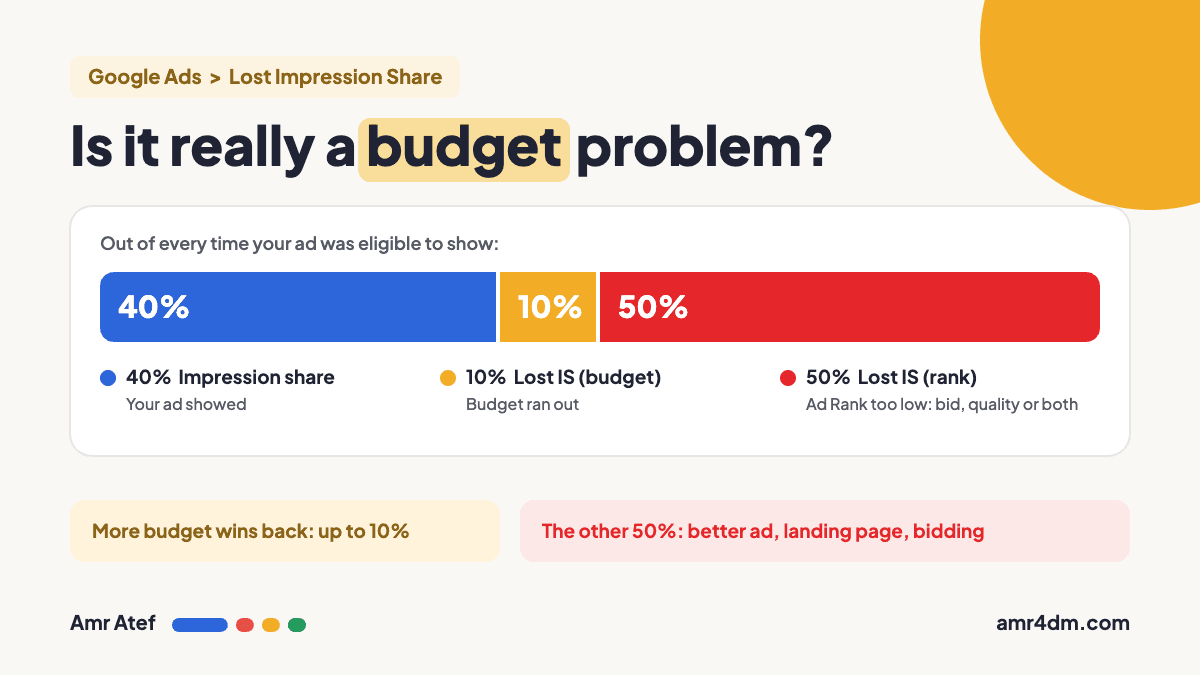
| Search impression share | 40% | Your ad showed in 40% of eligible auctions |
| Search lost IS (budget) | 10% | The most extra budget can win back |
| Search lost IS (rank) | 50% | Missed because of bid, quality, or both |
If you increase the budget here, the most you can gain is that 10%. The other 50% won’t come back with money. It comes back with a better ad, a better landing page and the right bid. In short: better user experience plus smarter bidding.
The problem is that increasing the budget is the easiest decision to make, so it happens a lot. Google reps often suggest it too. If you deal with one, my guide on whether Google Ads reps are sales or support (in Arabic) helps you judge those recommendations. But if the issue is rank, the extra money won’t fix anything.
What to Do for Each Type of Lost Impression Share
High Search Lost IS (Budget)
- First, check that the traffic you already get is profitable. Scaling a campaign that doesn’t convert just buys more of the same.
- Cut waste before adding money: block irrelevant searches with the search terms report, and make sure your location targeting isn’t spending budget outside your market.
- If the campaign is profitable and still limited, raise the budget gradually and watch cost per conversion.
High Search Lost IS (Rank)
- Improve ad relevance: write headlines that match the searcher’s intent, and keep each ad group on one tight theme. Tighter match types help here.
- Improve the landing page: fast, relevant to the ad, and easy to act on.
- Review your bids or bid strategy targets. A very strict target CPA or target ROAS lowers your bids, and that shows up as lost rank too.
- Don’t chase Ad Strength for this. It isn’t part of Ad Rank.
Both Are High
Fix rank first. A better ad and landing page usually lower what you pay per click, so the same budget goes further, and some of the budget loss shrinks on its own.
Where to Find Lost Impression Share in Google Ads
- Go to Campaigns in your Google Ads account.
- Click the Columns icon above the table.
- Open Competitive metrics.
- Check Search impr. share, Search lost IS (budget) and Search lost IS (rank).
- Click Apply, then track them over time.
Search lost IS (budget) only exists at the campaign level, so start there. Google’s guide to impression share data covers every column, and notes the data can take 24 to 48 hours to update.
One more tip: if there’s any metric you don’t understand, hover over the column name and Google explains it right there. Take your time reading those. You’ll thank me later.
More From This Google Ads Series
- Google Ads Location Targeting: Presence vs Presence or Interest
- Google Ads Ad Strength: Does It Matter? Why a Poor Ad Can Still Win
- Google Ads Match Types: Why Exact Match Isn’t Exact Anymore
- Google Ads Search Terms Report: The First Check Every New Advertiser Should Make
- Google Ads Quality Score: Why Higher Bids Don’t Always Win
- Search Term Mining in Google Ads: A Practical Guide
Frequently Asked Questions
What is lost impression share in Google Ads?
It’s the share of eligible impressions your ads didn’t get. Google splits it into Search lost IS (budget), caused by your budget running out, and Search lost IS (rank), caused by low Ad Rank.
What does Search lost IS (budget) mean?
The percentage of time your ads weren’t shown on the Search Network because your budget wasn’t enough. It’s only available at the campaign level.
What does Search lost IS (rank) mean?
The percentage of time your ads weren’t shown on the Search Network because of poor Ad Rank. Ad Rank depends on your bid, your ad and landing page quality, and the auction context.
Should I increase my budget if impression share is low?
Only if Search lost IS (budget) is high and the campaign is profitable. If most of the loss is rank, more budget won’t bring those impressions back.
How do I reduce Search lost IS (rank)?
Make your ads more relevant to the search, improve your landing page, and review your bids or bid strategy targets.
Where do I find lost impression share columns?
On the Campaigns page, click Columns, open Competitive metrics, and add Search impr. share, Search lost IS (budget) and Search lost IS (rank).
Sources
- Get impression share data, Google Ads Help
- About impression share, Google Ads Help
- About Ad Rank, Google Ads Help
- Use auction insights to compare performance, Google Ads Help
What’s the split between budget and rank in your account right now? Tell me on LinkedIn, and subscribe on YouTube for more Google Ads breakdowns.
About the author: Amr Atef is a Dubai-based performance marketing specialist focused on Google Ads and marketing technology, and the builder of BenaAds. He writes this practical Google Ads series for new advertisers. Follow him on LinkedIn and YouTube, or read more about Amr.
