The most painful wasted spend is the kind you caused yourself. Did you know your Google ad can show to people outside the country you’re targeting, without you noticing? Many advertisers find out late, after spending thousands of dollars and missing plenty of optimization opportunities.
Yet the very same setting, used in the right business, can bring in customers at a fraction of the cost. It’s a small option in your Google Ads location targeting called Location options. So when does it help, and when does it hurt?
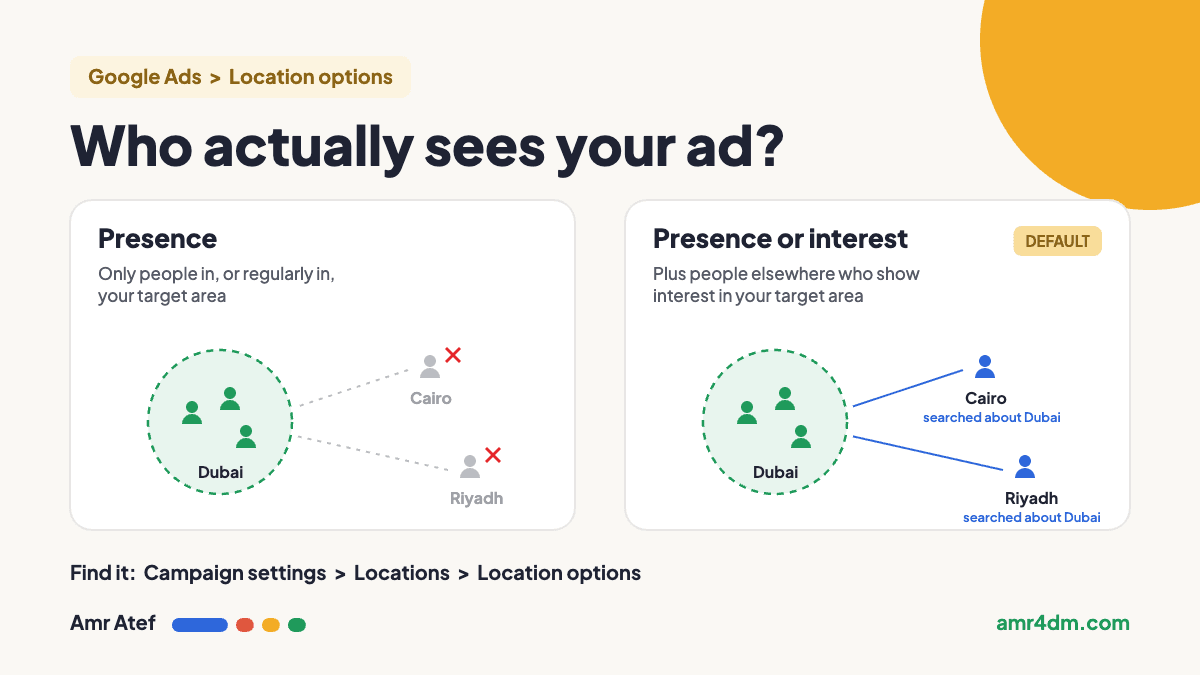
Quick answer: Google Ads location targeting has two location options. Presence or interest (the default) shows your ad to people in your target area and to people elsewhere who show interest in it. Presence shows it only to people who are in, or regularly in, your target area. Local services usually want Presence. Businesses that sell to people from abroad, like real estate, travel and education, can benefit from Presence or interest.
- The default can send your budget to other countries without you noticing.
- Pick the option based on where your real customers are, not on Google’s default.
- After testing, the Locations report shows where clicks and conversions really come from.
What Are Location Options in Google Ads?
Google Ads location targeting has two parts: the locations you pick, and the options underneath them. When you set the locations for a campaign, there’s a setting right underneath called Location options. It decides exactly who counts as being “in” your target location. Google’s page on advanced location options lists two choices:
| Location option | Who can see your ad | Default? |
|---|---|---|
| Presence or interest | People in, or regularly in, your target area, plus people who have shown interest in it, even if they’re not there | Yes, Google’s default and recommended option |
| Presence | Only people in, or regularly in, your target area | No, you have to choose it |
These options apply to Search, Display and Demand Gen campaigns. For excluded locations, the default works the other way: exclusions use Presence, so they block people who are located in the areas you exclude.
Why Are My Google Ads Showing in Other Countries?
In most accounts, the answer is the default in your Google Ads location targeting. With Presence or interest, someone sitting in another country can see your ad because they showed interest in your target location, for example by searching about it. If you never opened Location options, your campaign is very likely running this way right now.
That isn’t a bug, and it isn’t always bad. It just needs to be a decision you made on purpose.
When Presence or Interest Hurts: A Local Service
Take a domestic staffing company in Dubai. Someone in Cairo searches “domestic worker prices in Dubai”, just to compare. With the default setting, your ad shows, they click, and you pay for it. They were never going to hire a worker in Dubai.
| Search | Searcher | Presence or interest | Presence |
|---|---|---|---|
| domestic worker prices in Dubai | In Cairo, comparing prices | Ad can show, you pay for the click | Ad doesn’t show |
| domestic worker prices in Dubai | In Dubai, ready to hire | Ad can show | Ad can show |
Location options control who sees your ad. Your keywords control which searches trigger it. In my guide to Google Ads match types, I explain how much room broad, phrase and exact match give Google to decide that, and the search terms report shows which searches you actually paid for. You need both settings working together.
When Presence or Interest Helps: Real Estate, Travel and Education
Now take a real estate company in Dubai. Someone in Cairo or Riyadh searches “apartments for sale in Dubai”. That’s exactly the customer you want, and they aren’t in Dubai. With Presence only, you’d never reach them.
Google’s help page reports that advertisers in travel, real estate and education who switched from Presence to Presence or interest saw about 5% more conversions on Search campaigns. That figure comes from Google’s own internal data from 2022, so treat it as a direction worth testing, not a guaranteed result.
If you sell property to international buyers, my guide to HNWI lead generation covers the wider strategy beyond Search.
How to Choose Your Google Ads Location Targeting Option
Start with your budget. If one market is already saturated with your ads and you want to scale your Search campaigns into new regions, Presence or interest is an excellent scaling opportunity. Then ask whether your business type actually fits it.
| Your business | Start with | Why |
|---|---|---|
| Local service delivered on site (staffing, cleaning, maintenance, clinics) | Presence | The customer has to be there to buy |
| Bought from abroad (real estate, travel, education) | Presence or interest | Many buyers search from another country |
| Small budget, one city | Presence | Every click should come from people who can buy |
| Local market saturated, ready to scale | Presence or interest, then measure | Reaches interested people in new regions |
If you want more control over a new market, another option is a separate campaign that targets the buyers’ countries directly, with its own budget, language and ad copy. That keeps one market from quietly eating the other’s budget.
How to Change Your Location Options
- In Google Ads, go to Campaigns, then the Settings tab.
- Open the campaign you want to change.
- Expand Locations.
- Open Location options and choose Presence or Presence or interest.
- Click Save.
After Testing, Check the Locations Report
Whichever option you pick, test your Google Ads location targeting against real data: check where clicks are really coming from, and who converts and who doesn’t. Go to Campaigns, then Insights & reports, then When and where your ads showed, and open the Matched locations tab. Google’s guide to measuring geographic performance explains the difference between your targeted locations and the locations your ads actually matched.
- Sort by cost and look for countries that spend without converting.
- Compare cost per conversion by country, not just clicks.
- Exclude locations that keep wasting budget, or move a promising one into its own campaign.
And once the right people are seeing your ads, Quality Score decides how much you pay for each click.
More From This Google Ads Series
- Google Ads Match Types: Why Exact Match Isn’t Exact Anymore
- Google Ads Search Terms Report: The First Check Every New Advertiser Should Make
- Google Ads Ad Strength: Does It Matter? Why a Poor Ad Can Still Win
- Google Ads Quality Score: Why Higher Bids Don’t Always Win
- Search Term Mining in Google Ads: A Practical Guide
Frequently Asked Questions
What does Presence or interest mean in Google Ads?
It’s the default location option. Your ad can show to people who are in, or regularly in, your target location, and to people elsewhere who have shown interest in that location.
What is the difference between Presence and Presence or interest?
Presence shows your ad only to people who are in, or regularly in, your target area. Presence or interest also includes people outside the area who have shown interest in it.
Why are my Google Ads showing in other countries?
Usually because the campaign uses the default Presence or interest option, which can reach people outside your target location who show interest in it. Switch to Presence if your customers must be in the area.
Where do I find location options in Google Ads?
Go to Campaigns, open the Settings tab, select the campaign, expand Locations, then open Location options.
Which location option is best for real estate?
Often Presence or interest, because many property buyers search from another country. Google reports that travel, real estate and education advertisers who switched to it saw about 5% more conversions on Search, based on its 2022 internal data. Test it and check the Locations report.
How can I see which countries my clicks come from?
Go to Campaigns, Insights & reports, When and where your ads showed, and open the Matched locations tab.
Sources
- About advanced location options, Google Ads Help
- Target ads to geographic locations, Google Ads Help
- About measuring geographic performance, Google Ads Help
- View matched locations and distance reports, Google Ads Help
Have you ever found your budget leaking to a country you never meant to target? Tell me on LinkedIn, and subscribe on YouTube for more Google Ads breakdowns.
About the author: Amr Atef is a Dubai-based performance marketing specialist focused on Google Ads and marketing technology, and the builder of BenaAds. He writes this practical Google Ads series for new advertisers. Follow him on LinkedIn and YouTube, or read more about Amr.
