Imagine training a new salesperson. Every time they bring in someone who was never going to buy, you say “great job”. Then you decide to double their salary so they bring you more of the same.
That’s roughly what happens when you raise your ad budget while your Google Ads conversion tracking counts the wrong thing. The bidding system does exactly what you rewarded. It just does more of it.
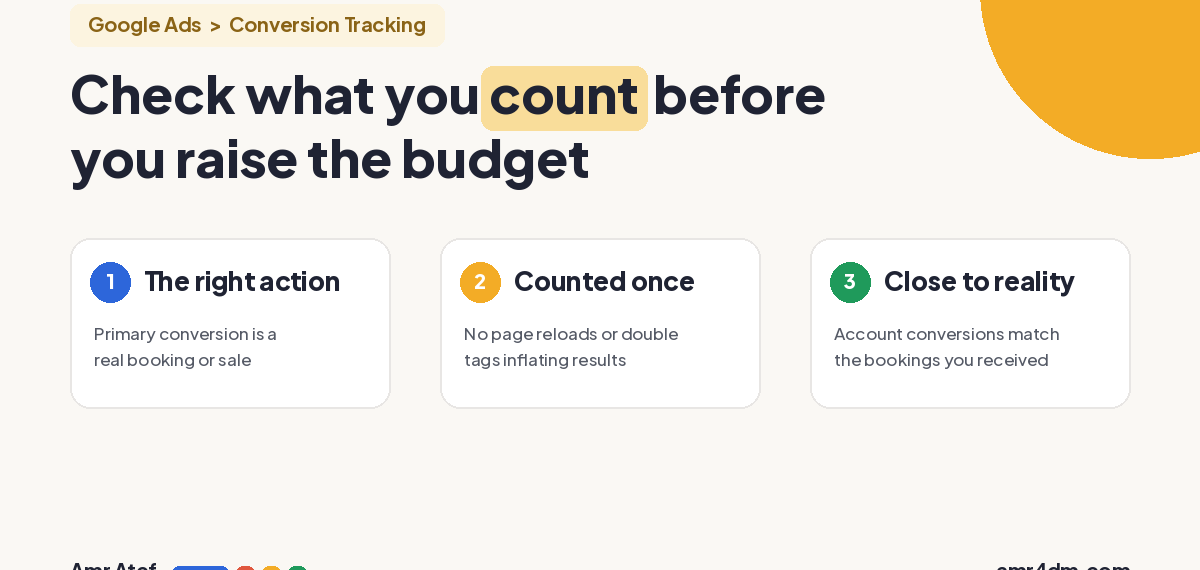
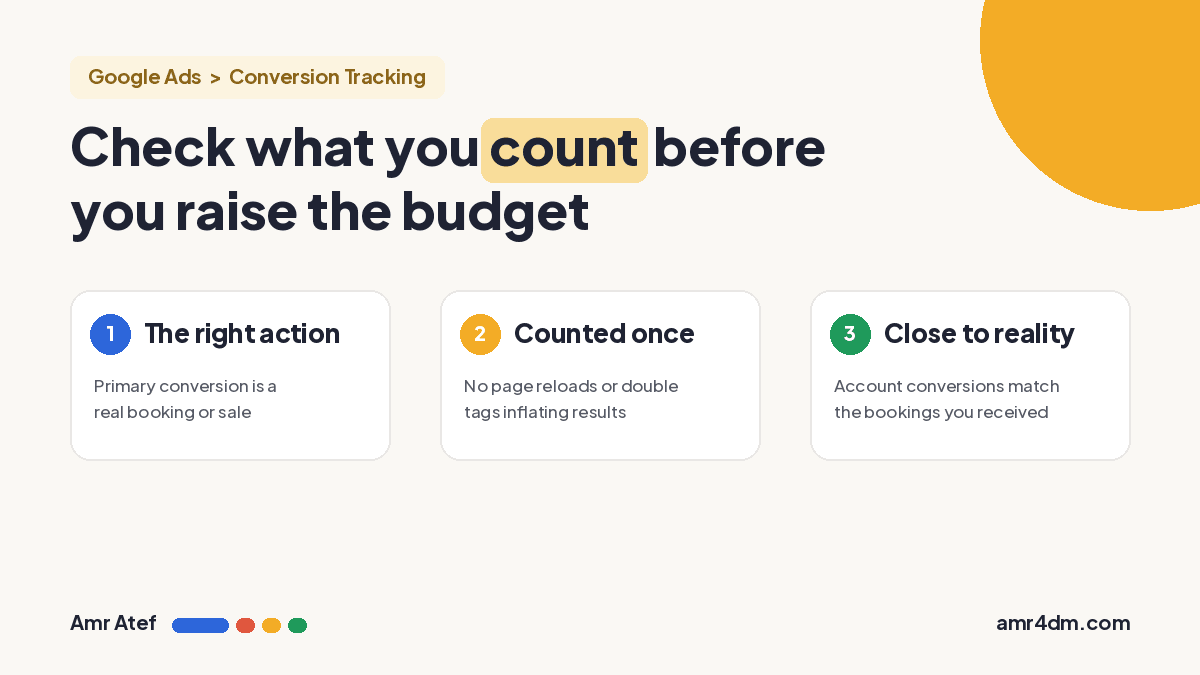
Quick answer: Smart Bidding learns from the conversions your account records, so those conversions tell it what a good customer looks like. If you count the wrong action, or count the right one twice, more budget buys more of the wrong people. Before you scale, check three things:
- Your primary conversion is an action that makes you money, not a button click or a page view.
- Each conversion is counted once.
- The conversions in your account are close to the bookings or sales you actually received.
What Is Conversion Tracking in Google Ads?
Conversion tracking is how Google Ads finds out that someone did what you wanted after interacting with your ad: bought something, filled in a form, or called you. Google defines a conversion action as “a specific customer activity that is valuable to your business” (Google Ads Help).
The key word is you. Google doesn’t decide what’s valuable to your business. You do, when you choose which actions to track. Whatever you pick becomes the definition of success for your campaigns.
Why the Algorithm Only Knows What You Tell It
Smart Bidding strategies like Maximize conversions and Target CPA can’t run without this data. Google says it plainly: “To use Google Ads Smart Bidding, you need to have conversion tracking enabled” (About Smart Bidding). The system uses your conversion history to predict which auctions are worth bidding on, and how much.
So every recorded conversion works like a message to the algorithm: “find more people like this one.” It doesn’t know your business. It doesn’t know which leads became customers. It only knows which clicks you marked as wins.
Meta’s ad delivery works on the same principle: an ad set optimizes for the event you choose. If that event is the wrong one, the system gets very good at the wrong thing.
Example: An AC Cleaning Company in Dubai
Back to the “AC cleaning Dubai” example from my Google Ads match types article. This is a hypothetical case, with no real numbers.
The company sets its conversion to a tap on the WhatsApp button. People tap, ask about the price, and disappear. The account fills up with conversions. The real bookings stay low.
| What happened | What Google Ads sees | What the business sees |
|---|---|---|
| Someone taps WhatsApp and asks the price | 1 conversion | A question, no booking |
| Someone taps WhatsApp and books a cleaning | 1 conversion | Revenue |
| Budget doubles | “Campaign is working, find more tappers” | More chats, bookings barely move |
From the algorithm’s side, both rows look identical, and the first kind is cheaper to get. So it learns to find more people who tap and ask. When the owner raises the budget, they’re paying more to get the same wrong people, in bigger numbers.
The campaign itself might be well built. The ad might be good and the offer better than the competition. But if the signal is wrong, the algorithm learns very well, just about the wrong thing.
When One Conversion Is Counted Twice
The second problem is quieter. The right action is tracked, but it’s counted more than once. A common case Google describes: a customer reloads the order confirmation page, “and a second conversion could be counted for the same order” (Google Ads Help on transaction IDs). Two tags firing for the same action, for example one installed directly and one through Google Tag Manager, can cause the same effect.
The result: conversions look doubled, your CPA (cost per acquisition) looks better than it really is, and you think the campaign is ready to scale when it isn’t.
Two settings help:
- Transaction ID for purchases. Google calls it “the recommended option for purchases”, and duplicates with the same ID aren’t counted.
- Count: One for leads. Google recommends counting “only one, unique lead per ad click”, so three form submissions from the same person count as one (About conversion counting options).
Primary vs Secondary Conversions: Which One Teaches the Algorithm?
Not every conversion action you track trains your bidding. Google Ads splits them in two (About primary and secondary conversion actions):
| Type | Shows in | Used for bidding? | Use it for |
|---|---|---|---|
| Primary | “Conversions” column | Yes, when its goal is used for bidding | The action that makes you money: a booking, a sale, a qualified lead |
| Secondary | “All conversions” column | No (unless part of a custom goal) | Signals you want to watch: WhatsApp taps, pricing page views |
In the AC cleaning example, the fix isn’t to stop tracking WhatsApp taps. It’s to make them secondary, and make the booking primary. If bookings happen offline, by phone or in a chat, Google offers enhanced conversions for leads, built for “sales that happen off a website” that started as a website lead.
3 Google Ads Conversion Tracking Checks Before You Raise Your Budget
Before any budget increase, ask yourself three questions:
- Am I counting the right thing? Open Goals > Conversions > Summary and check which actions are primary. If a button click or a page view is primary, that’s what your bidding is chasing.
- Am I counting it once? Check the count setting on each action (One for leads, Every for purchases), look for two tags firing on the same action, and add a transaction ID to purchase tags.
- Is the number in the account close to what came in? Compare last month’s conversions in Google Ads with the real orders or bookings in your CRM, your sheet or your till. If the gap is big, fix the tracking before you touch the budget.
Once tracking is clean, the next question is whether more budget can buy more results at all. That’s what Search lost IS (budget) vs lost IS (rank) tells you.
More From This Google Ads Series
- Lost Impression Share in Google Ads: Is It Budget or Rank?
- Google Ads Search Terms Report: The First Check Every New Advertiser Should Make
- Google Ads Match Types: Why Exact Match Isn’t Exact Anymore
- Google Ads Quality Score: Why Higher Bids Don’t Always Win
- The 5 Levels of Awareness: Why Your Landing Page Isn’t Converting
Frequently Asked Questions
What is Google Ads conversion tracking?
It’s how Google Ads records that someone completed a valuable action after interacting with your ad, such as a purchase, a form submission or a call. You choose which actions count as conversions.
Does Smart Bidding need conversion tracking?
Yes. Google says you need conversion tracking enabled to use Smart Bidding. The strategies learn from the conversions you record, so wrong conversion data leads to wrong bidding decisions.
What is the difference between primary and secondary conversions?
Primary conversions appear in the Conversions column and are used for bidding. Secondary conversions appear only in All conversions and are not used for bidding, unless they are part of a custom goal.
Why are my Google Ads conversions higher than my real sales?
Usually because a lighter action, like a button click, is set as a primary conversion, or because the same conversion is counted twice, for example after a confirmation page reload or from two tags on one action.
How do I stop duplicate conversions in Google Ads?
Add a unique transaction ID to purchase conversion tags, set lead actions to count One per click, and make sure only one tag fires for each conversion action.
Should I increase my Google Ads budget if CPA looks good?
Only after checking that the conversions behind that CPA are real. Compare account conversions with actual orders or bookings first. A good CPA built on inflated conversions will get worse as you scale.
Sources
- About conversion measurement, Google Ads Help
- About Smart Bidding, Google Ads Help
- About primary and secondary conversion actions, Google Ads Help
- About conversion counting options, Google Ads Help
- Use a transaction ID to minimize duplicate conversions, Google Ads Help
- About enhanced conversions, Google Ads Help
When did you last compare the conversions in your account with the bookings that actually came in? Tell me on LinkedIn, and subscribe on YouTube for more Google Ads breakdowns.
About the author: Amr Atef is a Dubai-based performance marketing specialist focused on Google Ads, conversion and marketing technology, and the builder of BenaAds. He writes a practical Google Ads series for new advertisers. Follow him on LinkedIn and YouTube, or read more about Amr.
