Supermetrics fans, gather round. Your job might be in danger.
For anyone who doesn’t know it: Supermetrics used to be a tool that pulled your ad numbers from every platform into one place, so you could make the decisions. Now it’s saying: since I already have the numbers, why don’t I make the changes too? That’s the idea behind Supermetrics Campaign Management, one of the clearest signs yet that the AI agent for Google Ads and every other ad platform is moving from reading data to acting on it.
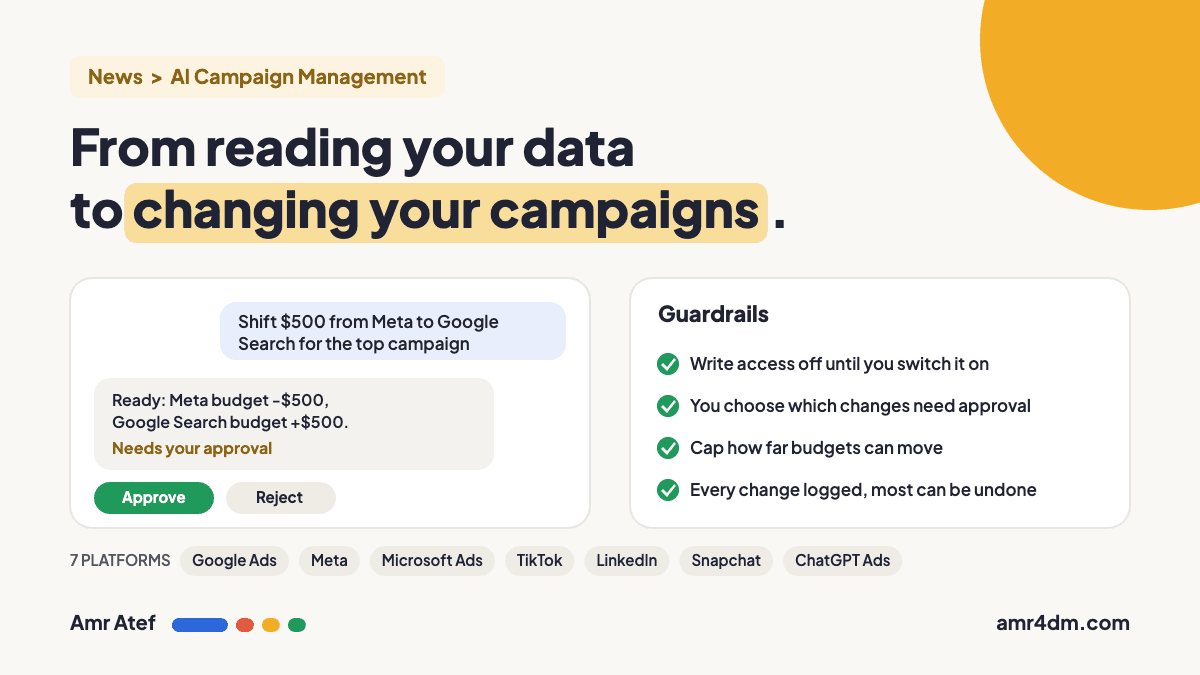
Quick answer: Supermetrics Campaign Management, announced on November 9, 2026, lets you create and edit ad campaigns from inside an AI chat like Claude or ChatGPT, across 7 platforms: Google Ads, Meta, Microsoft Advertising, TikTok, LinkedIn, Snapchat and ChatGPT Ads. Nothing changes until you switch on write access for an account, you choose which changes need your approval, you can cap how far budgets move, and every change is logged.
What Is Supermetrics Campaign Management?
It’s a new product that connects your AI chat to your ad accounts with write access. The official announcement sums up the flow: analyze your campaign data in AI, brainstorm next steps, then push changes back to your ad platforms.
| Details | |
|---|---|
| Announced | November 9, 2026 |
| Works in | Claude and ChatGPT, plus Supermetrics Studio. The setup guide also lists Gemini and the Supermetrics MCP server |
| Ad platforms | Google Ads, Meta, Microsoft Advertising, TikTok Ads, LinkedIn Ads, Snapchat, ChatGPT Ads |
| Requires | An active Supermetrics trial or subscription |
Supermetrics says more than 23,000 teams made over 570,000 campaign changes through its tools between June and October 2026. If the idea of an AI chat talking directly to your ad account sounds familiar, it’s the same direction I covered in Google Ads MCP explained.
What the AI Can Change
- Shift budgets and edit bids across campaigns, ad groups and ads, in one request
- Pause and unpause campaigns
- Create campaigns and ads, update targeting and swap creatives
- Review new creative and set it live from the same chat
What you can edit depends on the platform and the action. New campaigns are created paused, and only go live when you enable them.
Supermetrics also shares a customer example: Premier Cru Solutions, an agency serving wineries, rebuilt six Google Search campaigns in about 2 hours instead of an estimated 14, and estimates it saves around 30% of its time day to day. Keep in mind that’s the vendor’s own case study.
The Guardrails Against AI Mistakes
To keep AI hallucinations from turning into real spend, Supermetrics built in these controls (per its product page and documentation):
| Guardrail | How it works |
|---|---|
| Opt-in write access | Nothing changes on an account until you switch on write access for that specific account |
| Approval settings | Choose what needs your sign-off: nothing, going live, budget changes and going live, or every change to a live campaign |
| Budget limits | You can cap how far budgets can move |
| Change log | Every change is logged with what changed and who made it. Most changes can be reverted, but removed campaigns can’t be recovered |
Supermetrics recommends the strictest setting, approval for all live changes, for anyone starting out. I’d agree.
Should You Let AI Change Your Campaigns?
Full disclosure: I build BenaAds, an AI tool for creating Google Ads campaigns, so I’m clearly not against AI touching campaigns. But there’s a difference between AI doing the work and AI making the decision. Here’s how I’d split it:
| Let AI do it | Keep a human on it |
|---|---|
| Pulling reports and spotting issues | Strategy, positioning and offers |
| Bulk edits: naming, pausing, URL tags | Big budget moves between channels |
| Drafting new campaigns and ad copy (paused) | Deciding what goes live |
| Small budget shifts within a set cap | Anything that can’t be undone |
AI also sees only the data it’s given. It won’t know that a “low-performing” campaign exists for brand protection, or that a budget-limited campaign is actually losing to rank. Context like that still needs you.
How to Test It Safely
- Start with one low-risk account, not your biggest client.
- Use the strictest approval setting: all live changes.
- Set a budget cap before the first request.
- Review the change log weekly, the same way you’d review your search terms report.
- Loosen approvals only after a few weeks of clean results.
More From the Blog
- Google Ads MCP Explained: What It Actually Does for Advertisers
- ChatGPT Ads Update: New Manager Plugin, Audiences, MENA Launch
- Ogilvy ECHO: AI Celebrity Ads, Built on the Star’s Consent
- Reddit Search Ads: Reddit Is Testing Ads in Its Own Search Results
- Lost Impression Share in Google Ads: Is It Budget or Rank?
Frequently Asked Questions
What is Supermetrics Campaign Management?
A Supermetrics product, announced on November 9, 2026, that lets you analyze campaign data and push changes back to your ad platforms from an AI chat like Claude or ChatGPT.
Which ad platforms does it support?
Google Ads, Meta, Microsoft Advertising, TikTok Ads, LinkedIn Ads, Snapchat and ChatGPT Ads. Available edits depend on the platform and action.
Can the AI change my budgets without my approval?
Only if you allow it. Write access is off until you turn it on per account, and you can require approval for budget changes, for going live, or for every change to a live campaign. You can also cap how far budgets can move.
Can I undo changes the AI makes?
Every change is logged. You can revert most changes, such as budget, status, bidding and targeting, by asking the AI to restore the previous value. Removed campaigns can’t be recovered.
Should I let an AI agent manage my Google Ads?
Let it handle analysis and repetitive edits with approvals on, and keep strategy, big budget moves and go-live decisions with a person. Start on a low-risk account with the strictest approval setting.
Sources
- Supermetrics Campaign Management launch, Supermetrics blog
- Manage campaigns directly from your AI chats, Supermetrics
- How to manage ad campaigns with AI tools, Supermetrics Docs
Would you let AI make the decision and change your campaigns, or not? And why? Tell me on LinkedIn, and subscribe on YouTube for more on AI in advertising.
About the author: Amr Atef is a Dubai-based performance marketing specialist focused on Google Ads, AI and marketing technology, and the builder of BenaAds. He covers ad tech news and writes a practical Google Ads series for new advertisers. Follow him on LinkedIn and YouTube, or read more about Amr.
