A morning read before work, to apply while it’s fresh: exact match in Google Ads isn’t really “exact” anymore. Google can now show your ad for any search with the same meaning or intent as your keyword, not only an exact text match like before. That’s why Google Ads match types are the first thing to get right in any Search campaign. The match type decides exactly which searches your ad is allowed to show for.
Here’s how each of the three match types works today, what they look like with a real keyword, and how to choose between them.
What Are Google Ads Match Types?
Google Ads match types tell Google how closely a search needs to relate to your keyword before your ad can enter the auction. There are three: broad, phrase and exact. Broad match is the default for new keywords, so if you add a keyword without any symbols, you’re using broad.
| Match type | How you write it | Your ad can show for | Control |
|---|---|---|---|
| Broad | ac cleaning dubai | Searches related to your keyword, even without its direct meaning | Lowest |
| Phrase | "ac cleaning dubai" | Searches that include the meaning of your keyword | Medium |
| Exact | [ac cleaning dubai] | Searches with the same meaning or same intent | Highest |
The third column follows Google’s own keyword matching options page. Notice that none of the three says “the same words.”
Broad Match: Widest Reach, Handle With Care
With broad match, your ad can show for any search Google considers related to your keyword, even if the search doesn’t contain a single word of it. To decide what’s related, Google also looks at signals like the user’s recent searches, your landing page, and the other keywords in the same ad group.
That reach can find customers you’d never think to target. It can also spend your budget on searches that have nothing to do with your business. Handle with care.
Phrase Match: Nice and Balanced
Phrase match, written in quotes, shows your ad for searches that include the meaning of your keyword, usually with extra words before or after it. You get more reach than exact match while staying close to what you actually sell.
Exact Match: Same Meaning, Not Same Words
Exact match, written in square brackets, is the one that surprises people. It shows your ad for searches with the same meaning or the same intent as your keyword. Google handles this through close variants: typos, singular and plural forms, synonyms, reworded phrases, and queries with the same search intent.
Of all Google Ads match types, it’s still the one with the most control, and the sweet spot when you know exactly which keywords bring in customers and you’re working with a limited budget. One more advantage: when a search is identical to one of your exact match keywords, Google prioritizes that Search campaign over Performance Max.
One Keyword, Three Match Types: “AC Cleaning Dubai”
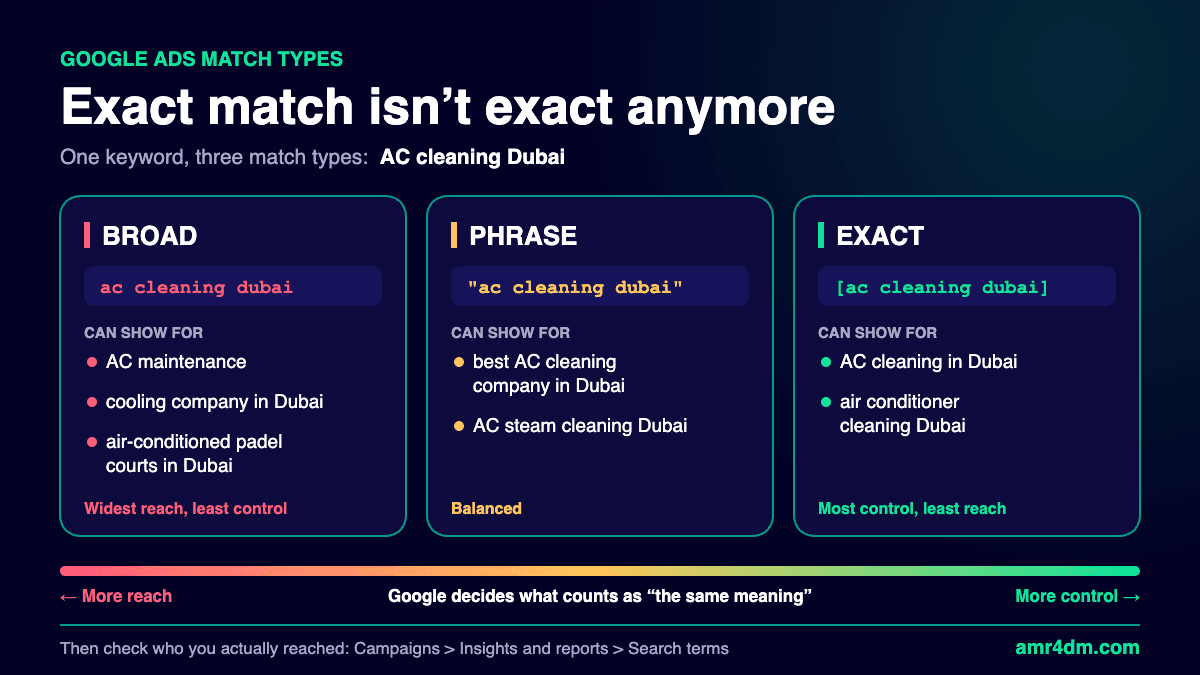
Here’s the same keyword with each of the Google Ads match types, and the kind of searches it can show for:
| Match type | Can show for | Why |
|---|---|---|
| Broad | AC maintenance, cooling company in Dubai, even air-conditioned padel courts in Dubai | Google sees them as related to AC or cooling |
| Phrase | best AC cleaning company in Dubai, AC steam cleaning Dubai | They carry the meaning of the keyword, plus extra words |
| Exact | AC cleaning in Dubai, air conditioner cleaning Dubai | Google treats them as the same meaning and intent |
These are examples of what Google can match, not guarantees. The final call on what counts as “related” or “the same meaning” is always Google’s, and that’s exactly why you need to check what actually happened.
Which Google Ads Match Type Should You Choose?
- Exact: for keywords you’re sure bring in customers, when you want full control, or when your budget is limited.
- Phrase: when you want to expand a bit without losing control. Keep a close eye on your search terms.
- Broad: works best with Smart Bidding and proper conversion tracking. Google itself calls Smart Bidding critical for broad match. Without both, things can get out of hand quickly.
| Your situation | Start with |
|---|---|
| Small budget, keywords you know convert | Exact |
| You want more reach but still want control | Phrase |
| New account with no conversion data yet | Exact and phrase |
| Smart Bidding on and conversion tracking set up properly | Broad can work |
A Note on AI Max for Search
If you turn on AI Max for Search campaigns, its search term matching uses broad match and keywordless technology to reach searches beyond your keyword list. In the search terms report, those matches appear with an “AI Max” match type. Treat it like broad match: switch it on only when your tracking and bidding are ready for it.
Whatever You Pick, Check Who Your Ad Actually Showed For
Choosing between Google Ads match types is only half the job. The other half is reviewing who your ad actually reached, and that happens in the search terms report. I break down how to read it, and how to block wrong clicks with negative keywords, in Google Ads Search Terms Report: The First Check Every New Advertiser Should Make.
Once your account has more data, my search term mining guide shows how to turn those searches into new keywords. And when the right people are seeing your ad, Quality Score decides how much you pay to stay there.
Frequently Asked Questions
What are the three Google Ads match types?
Broad, phrase and exact. Broad match shows your ad for related searches, phrase match for searches that include the meaning of your keyword, and exact match for searches with the same meaning or intent.
Is exact match still exact in Google Ads?
No. Exact match can show your ad for searches with the same meaning or the same intent as your keyword, including close variants such as typos, plurals, synonyms and reworded phrases.
What is the default match type in Google Ads?
Broad match. Any keyword you add without quotes or square brackets is treated as broad.
Which match type is best for a small budget?
Exact match, on keywords you already know bring in customers. It gives you the most control over where the budget goes.
Should I use broad match without Smart Bidding?
It’s risky. Google says Smart Bidding is critical with broad match, and broad match also needs proper conversion tracking to learn which searches are worth paying for.
Sources
- About keyword matching options, Google Ads Help
- Keyword close variants: Definition, Google Ads Help
- Optimize Google Ads with AI Max for Search campaigns, Google Ads Help
- About the search terms report, Google Ads Help
Which match type is spending most of your budget right now? Tell me on LinkedIn, and for video breakdowns of Google Ads, subscribe on YouTube.
About the author: Amr Atef is a Dubai-based performance marketing specialist focused on Google Ads and marketing technology, and the builder of BenaAds. Follow him on LinkedIn and YouTube, or read more about Amr.
